Cannot download generated report for kibana 8.19.7

Hello,

I have a problem with downloading generated reports in kibana 8.19.7 with ROR 1.68.

Report is being generated successfully and I see that in “Reporting list“ app and in created index “.ds-.kibana-reporting-.kibana-X“ but when I try to download it I get redirected to kibana_address/s/default/internal/reporting/jobs/download/XXXX-XXX-XXX-XXX-XXX?elasticInternalOrigin=true

which results in

{"statusCode":404,"error":"Not Found","message":"Not Found"}

and in kibana logs I see

[WARN ][plugins.reporting] No hits resulted in search

I checked with kibana 7.17.29+ror1.68 also connected to ES 8.19.7+ror1.68 and everything is working properly but in this version “the endpoint” (when I see window where I can choose destination location for file), is

kibana_address/s/default/api/reporting/jobs/download/XXXX

Could there be any bad config on my side?

Regards,
Michał

Hello @mikeIT

Could there be any bad config on my side?

No, I don’t think it’s related to the configuration

The download report action calls, search request to ES

PTH:/.kibana_admins_group/_search

Could you verify in your Access control log in the ES logs whether the Kibana index matches a user index?

[2026-02-24T05:37:32,661][INFO ][t.b.r.a.l.AccessControlListLoggingDecorator] [n1_it] ALLOWED by { name: 'ADMIN_GRP', policy: ALLOW, rules: [groups_any_of, kibana] req={ ID:7f709e55-0eb5-44da-9f80-664393409e1c-1687114729#5142, TYP:SearchRequest, CGR:admins_group, USR:admin, BRS:true, KDX:.kibana_admins_group, ACT:indices:data/read/search, OA:127.0.0.1/32, XFF:192.168.65.1, DA:127.0.0.1/32, IDX:.kibana_admins_group, MET:POST, PTH:/.kibana_admins_group/_search, CNT:<OMITTED, LENGTH=312.0 B> , HDR:x-elastic-client-meta=es=9.2.0,js=22.22.0,t=9.3.0,hc=22.22.0, user-agent=Kibana/9.3.0, x-ror-tenancy=U2FsdGVkX1+mBqSmufg9kAF5AAoWJ2vem6FcxJQOrg8ttgki0rr4weLagKLmxo+oyoBmpkhJz9rH1Zkc21H4VccMPtHgm/FP/ZM2OvlWl8pxQ/1VHuNJWqovDlZWLmPu, traceparent=00-e7f189e7befba7a3ccf807d4c9fb148e-89c35750c19b929b-00, cookie=__Host-ror.x-csrf-token-MC4wLjAuMDo1NjAx-session_id=5790f254852ee7dc6fb514e336abeacd; __Host-ror.x-csrf-token-MC4wLjAuMDo1NjAx=eaf301b13512ee4406253c3f5182a8d22456958f1331f5fc1595a95628d805bb.5649a04ec5fc727e917e08cb26ffbcc5822c5e3b7660072b6c324d800b6631bb3035e1c7043580d430944946f8465da7e401d45ba0640ce0e79d593dd696904e, x-ror-kibana-request-method=get, x-ror-kibana-request-path=/s/default/api/spaces/space, x-ror-current-group=admins_group, x-elastic-product-origin=kibana, content-type=application/vnd.elasticsearch+json; compatible-with=9, Content-Length=312, x-opaque-id=unknownId, keep-alive=timeout=10, max=1000, connection=keep-alive, Accept-Charset=utf-8, x-ror-kibana-index=.kibana_admins_group, x-forwarded-for=192.168.65.1, accept=application/vnd.elasticsearch+json; compatible-with=9, tracestate=es=s:0, Host=localhost:9200, x-ror-correlation-id=7f709e55-0eb5-44da-9f80-664393409e1c, Authorization=<OMITTED>, HIS:[KIBANA_SERVER-> RULES:[auth_key->false] RESOLVED:[group=admins_group;indices=.kibana_admins_group]], [USER_DEFAULT-> RULES:[auth_key->false] RESOLVED:[group=admins_group;indices=.kibana_admins_group]], [PERSONAL_GRP-> RULES:[groups_any_of->false] RESOLVED:[group=admins_group;indices=.kibana_admins_group]], [ADMIN_GRP-> RULES:[groups_any_of->true, kibana->true] RESOLVED:[user=admin;group=admins_group;av_groups=admins_group;indices=.kibana_admins_group;kibana_idx=.kibana_admins_group]], }                                                   
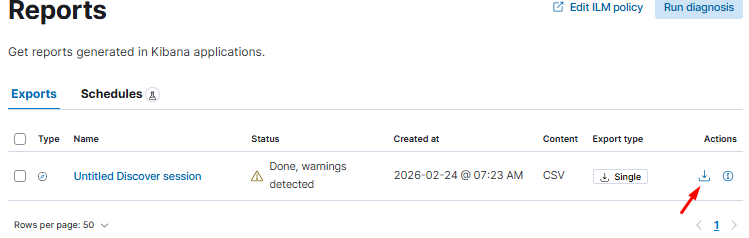
Hi @Dzuming I checked ES Logs and I do not see any errors related to the event when I click ‘Download‘

*maybe I should have mentioned that I use multiple kibana instances with specific “kibana.index“ in kibana.yml and the report was ‘Processed by’ different Kibana instance.

It won’t be an error, but an allowed log. The case is that maybe it is a problem with determining the correct Kibana index for this specific ES call

the report was ‘Processed by’ different Kibana instance.

Could you elaborate on? How do you know it? Does it mean that you create a report in the Kibana instance, kibana.index: x and you are able to see this report and click download in the Kibana instance with kibana.index: y?

“Does it mean that you create a report in the Kibana instance, kibana.index: x and you are able to see this report and click download in the Kibana instance with kibana.index: y

Yes and No :wink: I see that report only in “Reporting app” in that kibana instance(where I’ve generated it) + index “.ds-.kibana-reporting-.kibana-X-2026.02.24-000001“ and the only difference is “Processed by”(another kibana_instance).
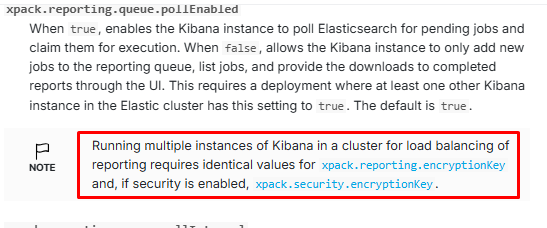
and the only difference is “Processed by”(another kibana_instance).

Since the task manager in Kibana is shared between all Kibana instances, it’s possible that instance X initialized report generation, but it will be processed by instance Y

Could you check if the Kibana index in the PTH:/<KIBANA_INDEX>/_search is different from what is declared in the kibana.index settings from kibana.yml? It will tell us whether the problem is with the index replacement.

How can I see this log? In debug mode via ES and/or ror user config with verbosity: info?

You should see it by default in the Elasticsearch logs, if you don’t set verbosity: error in the user ACL block.

I’ve checked ES logs with “verbosity:info“ only for one ‘user ACL block’. And after log in as that user in kibana, searching some data and then generated report I see these PTH in logs:

“PTH:/.kibana-X/_doc/space:default”

“PTH:/KBN_INDEX_PATTERN-*/_field_caps“

“PTH:/KBN_INDEX_PATTERN-*/_async_search“

“PTH:/.kibana-X_analytics_8.19.7/_search“

“PTH:/.kibana-X/_pit“

“PTH:/.kibana-X/_doc/config:8.19.7“

“PTH:/_search“

“PTH:/_data_stream/logs“, “PTH:/_pit“

“PTH:/_readonlyrest/metadata/current_user“

I tried to investigate and would like to addtionaly ask about that “kibana_address/s/default/api/reporting/jobs/download/XXXX“. Is it used by kibana ‘by default’ or added/used via Readonlyrest? It doesn’t seem to be official URL like in previous 7.X versions Automatically generate reports | Kibana Guide [8.19] | Elastic