Errors after upgrade Kibana 7.17.29 to 8.19.7

ok, great!

I hope you will be able to solve the problem with these FORBIDDEN requests on your own. It’s kind of a business-related problem :wink:

The fix will be released with ROR 1.68.0 or with the next 1.67.x patch version (if we decide to publish the patch version)

when can I expect a newer version? :upside_down_face:

We wanted to do the 1.68.0 release before the New Year.

ROR 1.68.0 is released

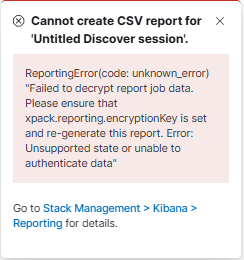
Testing ROR 1.68 with Kibana 8.19.7 AND ES 8.19.7 results in new errors. When I try to generate “search query CSV Report“ from Discover Tab (Export ~> Generate CSV) I get popup message “ReportingError(code: unknown_error) “Failed to decrypt report job data. Please ensure that xpack.reporting.encryptionKey is set and re-generate this report. Error: Unsupported state or unable to authenticate data”“

The same is for:

  • Kibana 8.19.7(ROR 1.67.3)+ ES 8.19.7(ROR 1.68)
  • Kibana 8.19.7(ROR 1.68)+ ES 8.19.7(ROR 1.67.2)
  • Kibana 8.19.7(ROR 1.68)+ ES 8.19.7(ROR 1.68)

Only for:

  • Kibana 7.17.29 (ROR 1.67.2) + ES 8.19.7 (ROR 1.67.2)
  • Kibana 7.17.29 (ROR 1.67.2) + ES 8.19.7 (ROR 1.68)
  • Kibana 7.17.29 (ROR 1.68) + ES 8.19.7 (ROR 1.67.2)
  • Kibana 7.17.29 (ROR 1.68) + ES 8.19.7 (ROR 1.68)

CSV reports are being properly generated.

Hello @mikeIT

Could you share your kibana.yml file?

Hello,

My kibana.yml config file for KBN 8.19.7:

server.port: ip_port
server.host: "ip_xxx"
server.name: "XXX"
server.publicBaseUrl: "http://ip_address/XXX"
server.basePath: "/XXX"
server.rewriteBasePath: False

readonlyrest_kbn.cookieName: "XXX"
readonlyrest_kbn.sessions_probe_interval_seconds: 36000
readonlyrest_kbn.session_timeout_minutes: 4320
readonlyrest_kbn.store_sessions_in_index: True
readonlyrest_kbn.sessions_index_name: ".readonlyrest_kbn_sessions_XXX"
readonlyrest_kbn.cookiePass: 'XXX'
readonlyrest_kbn.license.activationKeyRefreshInterval: '1d'

elasticsearch.hosts: "http://ip:port"
elasticsearch.requestTimeout: 300000
elasticsearch.requestHeadersWhitelist: ['Cookie', 'Authorization']
elasticsearch.username: ...
elasticsearch.password: ...

kibana.index: ".XXX"
logging:
  appenders:
    file:
      type: file
      fileName: /kibana_XXX/logs/kibana.log
      layout:
        type: pattern
  root:
    appenders: [default,file]

#xpack.task_manager.index: ".task-manager-XXX"
#xpack.reporting.index: ".reporting-XXX"
monitoring.enabled: true
monitoring.kibana.collection.enabled: true
xpack.reporting.encryptionKey: "..."
xpack.encryptedSavedObjects.encryptionKey: "..."

@mikeIT

Thanks, could you also send the newest readonlyrest.yml file?

My ldap user readonlyrest config is still the same as the one from this topic :slight_smile:

- name: "::X LDAP::"
      ldap_auth:
        name: "ldap"
        groups_any_of: ["xxx"]
      indices: [".kibana*",".reporting-*", ".ds-.kibana-*", ".kibana-reporting-*", "xxx-*"]
      verbosity: error
      kibana:
        access: rw
        index: ".kibana-xxx"
      type: allow

Hi @mikeIT

A few more questions:

  1. Did you test it on the fresh Kibana/Elasticsearch instances? If not, did you have old reports, and are you able to open them?

  2. Do you use multiple Kibana instances? If yes, can you confirm that every instance shares the same xpack.encryptedSavedObjects.encryptionKey?

Ad.1 Did you test it on the fresh Kibana/Elasticsearch instances? If not, did you have old reports, and are you able to open them?

No, Elasticsearch instance is not fresh, it’s upgraded one from 7.17.29, Kibana 8.19.7 is quite fresh(not upgraded, installed separately). During yesterday’s tests I did not have any old reports for that specific kibana instance.

Ad2. Do you use multiple Kibana instances? If yes, can you confirm that every instance shares the same xpack.encryptedSavedObjects.encryptionKey?

Yes, I do have multiple, different kibana instances in version 7.17.29, plus only that one in version 8.19.7. But every instance has self-specific “kibana.index“ with the same ‘xpack.encryptedSavedObjects.encryptionKey‘ AND xpack.reporting.encryptionKey (both not common for all different ones Kibanas).

Hi @mikeIT

Could you share your Kibana logs after migration from Kibana 7.17.29 to 8.19.7?

In kibana 8.19.7 logs I just see these lines:

[2026-01-12T09:10:59.605+01:00][info][plugins][ReadonlyREST][identitySessionHeadersValidation][x-ror-correlation-id=XXX] Current session successfully revalidated against ES
[2026-01-12T09:11:16.073+01:00][info][plugins][ReadonlyREST][authController][x-ror-correlation-id=XXX] Refreshing session against ES
[2026-01-12T09:12:04.589+01:00][INFO ][plugins.reporting] Scheduled csv_searchsource reporting task. Task ID: task:YYY. Report ID: X-X-X-X-X
[2026-01-12T09:12:11.450+01:00][info][plugins][ReadonlyREST][identitySessionHeadersValidation][x-ror-correlation-id=XXX] Current session successfully revalidated against ES

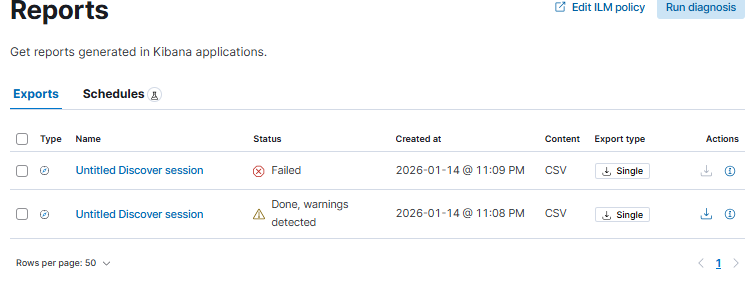
In Kibana GUI for that attempt

and then after attempt 3 of 3 ~> Failed + “Cannot create CSV report for ‘Untitled Discover session’.

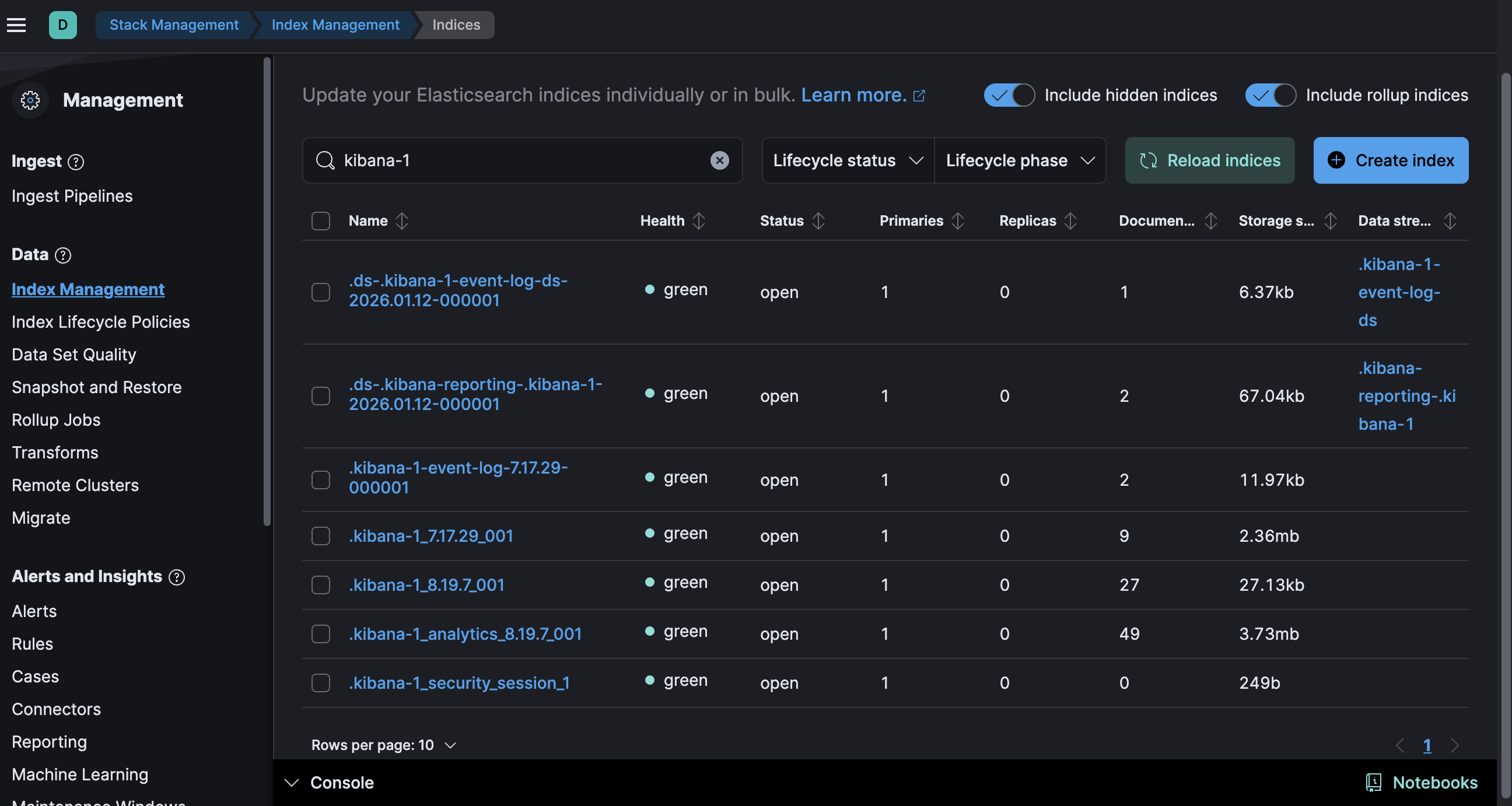
Could you also check whether all indices for Kibana 8.19.7 were created successfully?

Yes, I checked again and do not see any problems with any indices (neither kibana nor other in my cluster).

*For active Kibanas 7.17.29 with different specific kibana.index everything is working okay.

@mikeIT Hello,

I still cannot reproduce the issue on my side. As I see, someone had a similar problem on this thread and setting xpack.reporting.queue.pollEnabled: false resolved it. Could you try to set this flag?

Didn’t work.

I think I’ve finally found the solution to my problem :slight_smile:

The problem was caused by lack of “xpack.security.encryptionKey“ in kibana.yml for 8.X.

After unifying ‘xpack.encryptedSavedObjects.encryptionKey‘ and ‘xpack.reporting.encryptionKey‘ for all my kibana instances and then starting Kibana 8.X instance, in kibana logs there was this line: ‘[WARN ][plugins.security.config] Generating a random key for xpack.security.encryptionKey. To prevent sessions from being invalidated on restart, please set xpack.security.encryptionKey in the kibana.yml or use the bin/kibana-encryption-keys command.

for other parameters only these logs:

[INFO ][plugins.encryptedSavedObjects] Hashed ‘xpack.encryptedSavedObjects.encryptionKey’ for this instance: XXX

[…]

[INFO ][plugins.reporting.config] Hashed ‘xpack.reporting.encryptionKey’ for this instance: XXX

I will test some more.

@Dzuming Unfortunately something is still wrong for KBN 8.X or just 8.19.X. Sometimes I’m able to generate reports properly and sometimes not.

I noticed that for “Failed” the report was “Processed by admin“(I do not have such user) and I see

For successfull report creation I see ‘Processed by’ as “ROR config section user id“ and I see ther are 2 documents in index ".ds-.kibana-reporting-.kibana-XXX-2026.01.14-000001“

To Kibana I’m always logged as ldap user.

Hello @mikeIT

I assume there are 403 forbidden messages in the Elasticsearch logs, related to report generating. Could you provide them? Also, could you provide success logs related to report generation?

Also, do you see any errors in the Kibana logs?

Hello

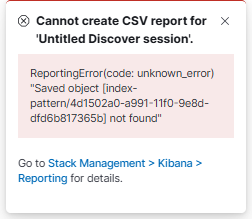
In elasticsearch logs I do see only one message per one attempt [open Discover ~> search query ~> Generate report ~> and again the same (last one Failed suddenly “Processed by admin“ and this time for logs from other “index_pattern/data_view/index“)

[2026-01-15T18:09:29,294][INFO ][t.b.r.a.l.AccessControlListLoggingDecorator] [...] ESC[35mFORBIDDEN by { name: '::Forbid API calls for some specific roles::', policy: FORBID, rules: [ldap_auth, uri_re] req={ ID:XXX#204958833, TYP:GetDataStreamAction$Request, CGR:USER_LDAP_ROLE, USR:XXXUSER, BRS:true, KDX:null, ACT:indices:admin/data_stream/get, OA:HOST_IP/32, XFF:USER_IP, DA:HOST_IP/32, IDX:<N/A>, MET:GET, PTH:/_data_stream/logs, CNT:<N/A>, HDR:x-opaque-id=unknownId, cookie=x-csrf-token-XXX-session_id=XXX; x-csrf-token-XXX=YYY.YYYY, x-ror-kibana-request-method=get, x-ror-kibana-index=.kibana-X, accept=application/vnd.elasticsearch+json; compatible-with=8,text/plain, x-elastic-product-origin=kibana, traceparent=00-X-X-00, tracestate=es=s:0, x-elastic-client-meta=es=8.19.1,js=22.17.1,t=8.9.6,hc=22.17.1, Authorization=<OMITTED>, Host=HOST_IP:HOST_PORT, x-ror-correlation-id=X-X-X-X-X, x-forwarded-for=USER_IP, content-length=0, x-ror-kibana-request-path=/s/default/api/streams/_status, user-agent=Kibana/8.19.7, keep-alive=timeout=10, max=1000, connection=keep-alive, Accept-Charset=utf-8, HIS:[Accept all requests from localhost-> RULES:[hosts->false]], [::XXX0::-> RULES:[auth_key->false]], [::Forbid API calls for some specific roles::-> RULES:[ldap_auth->true, uri_re->true] RESOLVED:[user=XXXUSER;group=LDAP_ROLE;av_groups=XXX_LDAP_ROLES]], }ESC[0m

[2026-01-15T18:09:50,279][INFO ][t.b.r.a.l.AccessControlListLoggingDecorator] [...] ESC[35mFORBIDDEN by { name: '::Forbid API calls for some specific roles::', policy: FORBID, rules: [ldap_auth, uri_re] req={ ID:XXX#204964480, TYP:GetDataStreamAction$Request, CGR:USER_LDAP_ROLE, USR:XXXUSER, BRS:true, KDX:null, ACT:indices:admin/data_stream/get, OA:HOST_IP/32, XFF:USER_IP, DA:HOST_IP/32, IDX:<N/A>, MET:GET, PTH:/_data_stream/logs, CNT:<N/A>, HDR:x-opaque-id=unknownId, cookie=x-csrf-token-XXX-session_id=XXX; x-csrf-token-XXX=YYY.YYYY, traceparent=00-X-X-00, x-ror-kibana-request-method=get, x-ror-kibana-index=.kibana-X, accept=application/vnd.elasticsearch+json; compatible-with=8,text/plain, x-elastic-product-origin=kibana, tracestate=es=s:0, x-elastic-client-meta=es=8.19.1,js=22.17.1,t=8.9.6,hc=22.17.1, Authorization=<OMITTED>, Host=HOST_IP:HOST_PORT, x-ror-correlation-id=X-X-X-X-X, x-forwarded-for=USER_IP, content-length=0, x-ror-kibana-request-path=/s/default/api/streams/_status, user-agent=Kibana/8.19.7, keep-alive=timeout=10, max=1000, connection=keep-alive, Accept-Charset=utf-8, HIS:[Accept all requests from localhost-> RULES:[hosts->false]], [::XXX0::-> RULES:[auth_key->false]], [::Forbid API calls for some specific roles::-> RULES:[ldap_auth->true, uri_re->true] RESOLVED:[user=XXXUSER;group=LDAP_ROLE;av_groups=XXX_LDAP_ROLES]], }ESC[0m

[2026-01-15T18:10:20,244][INFO ][t.b.r.a.l.AccessControlListLoggingDecorator] [...] ESC[35mFORBIDDEN by { name: '::Forbid API calls for some specific roles::', policy: FORBID, rules: [ldap_auth, uri_re] req={ ID:XXX#204985872, TYP:GetDataStreamAction$Request, CGR:USER_LDAP_ROLE, USR:XXXUSER, BRS:true, KDX:null, ACT:indices:admin/data_stream/get, OA:HOST_IP/32, XFF:USER_IP, DA:HOST_IP/32, IDX:<N/A>, MET:GET, PTH:/_data_stream/logs, CNT:<N/A>, HDR:x-opaque-id=unknownId, cookie=x-csrf-token-XXX-session_id=XXX; x-csrf-token-XXX=YYY.YYYY, x-ror-kibana-request-method=get, x-ror-kibana-index=.kibana-X, accept=application/vnd.elasticsearch+json; compatible-with=8,text/plain, traceparent=00-X-X-00, x-elastic-product-origin=kibana, tracestate=es=s:0, x-elastic-client-meta=es=8.19.1,js=22.17.1,t=8.9.6,hc=22.17.1, Authorization=<OMITTED>, Host=HOST_IP:HOST_PORT, x-ror-correlation-id=X-X-X-X-X, x-forwarded-for=USER_IP, content-length=0, x-ror-kibana-request-path=/s/default/api/streams/_status, user-agent=Kibana/8.19.7, keep-alive=timeout=10, max=1000, connection=keep-alive, Accept-Charset=utf-8, HIS:[Accept all requests from localhost-> RULES:[hosts->false]], [::XXX0::-> RULES:[auth_key->false]], [::Forbid API calls for some specific roles::-> RULES:[ldap_auth->true, uri_re->true] RESOLVED:[user=XXXUSER;group=LDAP_ROLE;av_groups=XXX_LDAP_ROLES]], }ESC[0m

“Forbid API calls for some specific roles“ is my rule to restrict LDAP users from using some api actions via “Dev tools“ app and there it works successfully for Kibana 7.17.X and 8.19.X