User access to index management

Hello,

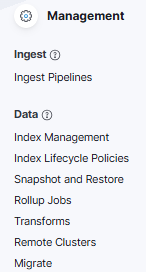
I have a question if the “standard“ RW (ldap or local_ror), nonAdmin user should have an access to ‘Stack Management’ → ‘Index management’ tab for example

(from different topic Errors after upgrade Kibana 7.17.29 to 8.19.7 - #34 by Dzuming )?

Shouldn’t that details for indices accessible by readonlyrest ‘indices‘ rule, be available for only users with higher permissions? :slight_smile:

I see that other ‘apps’

are not available.

Hello @mikeIT

Shouldn’t that details for indices accessible by readonlyrest ‘indices‘ rule, be available for only users with higher permissions?

Only RO and RO_STRICT The user access level has no access to the Index management tab (and a few more). However, the visibility of specific features is fully configurable via kibana.hide_apps ACL block property.

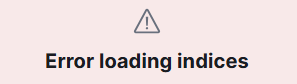
Okay, thank you for explanation. I see the difference between 8.X and 7.X. In kibana 7.17.X when logged as RW ldap user I always got

image

with my custom message from ror config “response_if_req_forbidden“. Apparently KBN ver.8 handles this restriction differently and allows access.

Hello @Dzuming What about “Stack Management ~> Kibana/(Index Patterns[7.X] | Data Views[8.X])“ tab. Is there any way to restrict RW users from modifying(create, update, delete) the details of this tab at least via uri_re + methods rule?

Hello @mikeIT

You can try to use actions rule to restrict the user from a specific action, by adding a forbid block

        -   name: USER
            auth_key: <USER>
            type: "forbid"
            kibana:
                actions: [ "indices:data/read/*" ] 

Wouldn’t this action block user from accessing logs within added patterns in ‘Discover’ tab? I’ve thought just about possible restriction to modify or delete ‘patterns’ but cannot figure out how :slight_smile:

No,

It matches a specific Elasticsearch-level action associated with the request. You can check a specific action by taking a look at ACTinfo in the access logs, so you need to find out what the ACLvalue for your specific request is, and add it to the actionsrule

[2026-02-06T06:38:22,044][INFO ][t.b.r.a.l.AccessControlListLoggingDecorator] [n1_it] ALLOWED by { name: 'ADMIN_GRP', policy: ALLOW, rules: [groups_any_of, kibana_hide_apps, kibana_access] req={ ID:ab121ea0-a9cf-4067-9a6d-5ebeadb628dc-1511127301#4013, TYP:GetRequest, CGR:admins_group, USR:admin, BRS:true, KDX:.kibana, ACT:indices:data/read/get, OA:127.0.0.1/32, XFF:192.168.65.1, DA:127.0.0.1/32, IDX:.kibana, MET:GET, PTH:/.kibana/_doc/space:default, CNT:<N/A>, HDR:x-elastic-client-meta=es=9.2.0,js=22.22.0,t=9.3.0,hc=22.22.0, user-agent=Kibana/9.3.0, content-length=0, x-ror-kibana-request-path=/s/default/app/home, traceparent=00-97984d77e8e4054074d15864746c7dbc-2f0c9cb5b4a5cc52-00, x-ror-current-group=admins_group, x-elastic-product-origin=kibana, x-forwarded-for=192.168.65.1, cookie=__Host-ror.x-csrf-token-MC4wLjAuMDo1NjAx-session_id=26c89471c18e723158de41aad4759841; __Host-ror.x-csrf-token-MC4wLjAuMDo1NjAx=d69170af5313866121bf8c777804b2d93ae81b93fb0bbc16b7d7618459abb67e.ca1dff3f71c0913caa241e160b31dc5a63b6c18628a04fdad2b9ee5f21d9c93b66bc7a862561d4590ad13ee5293c6b0e0d434201306840c5f39a2a738a8aba42, Authorization=<OMITTED>, content-type=application/json, accept=application/vnd.elasticsearch+json; compatible-with=9,text/plain, x-ror-kibana-index=.kibana, x-opaque-id=unknownId, x-ror-kibana-request-method=get, x-ror-correlation-id=ab121ea0-a9cf-4067-9a6d-5ebeadb628dc, keep-alive=timeout=10, max=1000, connection=keep-alive, Accept-Charset=utf-8, tracestate=es=s:0, Host=localhost:9200, HIS:[Kibana service account - user/pass-> RULES:[auth_key->false] RESOLVED:[group=admins_group;indices=.kibana]], [ADMIN_GRP-> RULES:[groups_any_of->true, kibana_hide_apps->true, kibana_access->true] RESOLVED:[user=admin;group=admins_group;av_groups=admins_group;indices=.kibana;kibana_idx=.kibana]], }
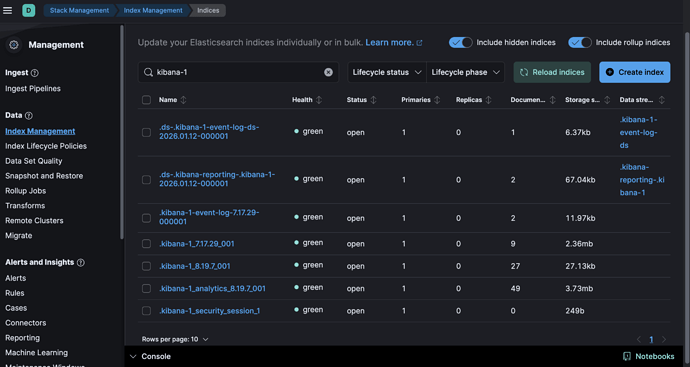
So there isn’t any possibility to get “specific kibana request“ for actions in “Data views“ using methods http [PUT/DELETE] and uri_re rules like requests via Kibana API? Unfortunately I do not see any elastic actions for that.

‘indices:data/read/‘ or ‘indices:data/write/‘ could restrict RW users from creating Visualisations or Dashboards that get saved in kibana index.

Yes, you need to use the headers rule, and find x-ror-kibana-request-path value in your Access control log, like

        -   name: USER_DEFAULT
            type: "forbid"
            methods: ['POST']
            headers: [ "x-ror-kibana-request-path:/s/default/api/content_management/rpc/create" ]
            kibana:
                access: rw