Problem with saved objects in Kibana

Hello,

after using Kibana 8.19.7 with ROR 1.68 for a few weeks I saw a strange behaviour in “Saved objects“ tab when I restricted user block in ROR config by changing ‘indices‘ rule from “indices: [“.kibana-*”]“ to “indices: [“.kibana-X”]“ with additional kibana: index: “kibana-X“. I have more than one different kibana instances.

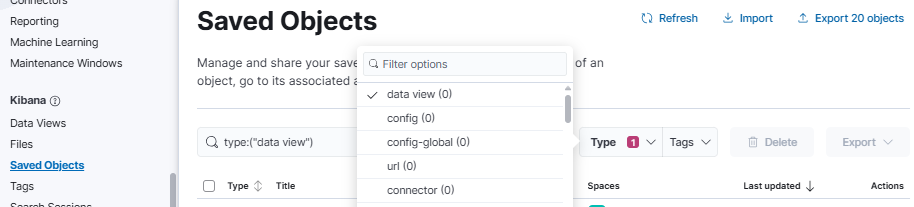
When I open either “Data views“ or “Visualisation Library” or "Dashoards” as ldap user I see existing objects. But when I try to get these in “Saved objects“, by default I only get ‘config‘ and ‘config-global‘ objects. After using filter ‘Type‘ and choosing e.g. ‘data view (0)‘ I get existing ‘data view‘ objects for my custom KBN kibana.index. The same with visualization(0)‘ or ‘dashboard(0)‘. But with chosen more filters e.g. connector(0) or rule(0) the view gets refreshed and only configs are back there.

I tried to check again by reverting indices rule to “kibana-*” in ‘indices’ and with this rule, in “Saved objects“ I see all existing objects with real counter in filters, but I am trying to restrict view of all kibana indices in my cluster (in Index Management) for all users that shouldn’t see indices that are not permitted.

Hi @mikeIT

Are you able to reproduce the problem in the ROR Sandbox? We could easily check why.

I will try to use the ROR Sandbox.

Additionaly I’ve just tested that for me this problem also exists when I deleted all saved objects and successfully imported (queries/index_patterns/dashboards/visualisations) again from .ndjson file.

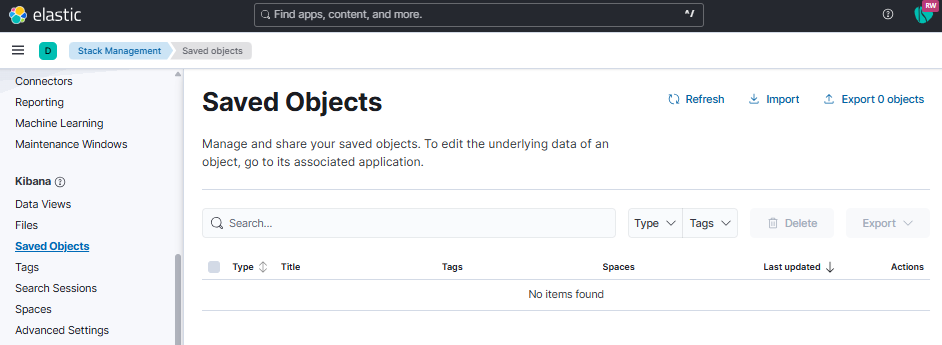
By default I don’t see any objects ~> ‘No items found‘. Only when I filter specific object Type.

But in “Data views“ all imported/existing patterns are there.

My user block config is this one:

- name: "::X LDAP::"
  ldap_auth:
    name: "ldap"
    groups_any_of: ["LDAP_X"]
  indices: [".kibana-X",".reporting-*",".ds-.kibana-reporting-.kibana-*", ".kibana-reporting-*", "x-*"]
  verbosity: error
  kibana:
    access: rw
    index: ".kibana-X"
  type: allow

@mikeIT you have multiple kibana instances? Is this HA configuration?

TBH I’m having hard time understanding your configuration, can you post it (sanitized) in the thread? Also, would be nice to see the logs with `verbosity: info` in the ACL block, to see which block is evaluated and how.

So my Idea is that you put verbosity: info everywhere and start one kibana in isolation, see what indices it’s asking for and how the ACL processes the request (it will show the index, the action, and the exit status of each rule in each block)

Hi @sscarduzio

“you have multiple kibana instances? Is this HA configuration?“ No, I have multiple kibana instances with its own kibana.index(different saved objects, settings etc.).

Setting ‘verbosity: info’ helped me a little to understand the problem.

When I logged in to kibana I got

[2026-02-07T07:38:24,423][INFO ][t.b.r.a.l.AccessControlListLoggingDecorator] [ES_NODE] ESC[36mALLOWED by { name: '::X LDAP::', policy: ALLOW, rules: [ldap_auth, kibana, indices] req={ ID:XX-XX-XXX-XXX-XXXXXX-XXX#XXXX, TYP:RRUserMetadataRequest, CGR:LDAP_X, USR:XXX, BRS:true, KDX:.kibana-X, ACT:cluster:internal_ror/user_metadata/get, OA:NODE_IP/32, XFF:null, DA:NODE_IP/32, IDX:<N/A>, MET:GET, PTH:/_readonlyrest/metadata/current_user, CNT:<N/A>, HDR:Host=NODE_IP:NODE_PORT, Accept-Encoding=gzip,deflate, Accept=*/*, Connection=keep-alive, User-Agent=node-fetch/1.0 (+https://github.com/bitinn/node-fetch), content-length=0, x-ror-correlation-id=XX-XX-XX-XX-XXXX, tracestate=es=s:0, traceparent=00-XXX-XXX-00, cookie=x-csrf-token-XXXX-session_id=XXXXX; x-csrf-token-XXXX=03XXX.XXXX, Authorization=<OMITTED>,
...

and when I open “Saved objects tab“ I see

and the first log I get is “INDEX NOT FOUND“

[2026-02-07T07:39:20,079][INFO ][t.b.r.a.l.AccessControlListLoggingDecorator] [ES_NODE] ESC[35mINDEX NOT FOUND req={ ID:XX-XX-XXX-XXX-XXXXXX-XXX#XXXX, TYP:SearchRequest, CGR:<N/A>, USR:XXX (attempted), BRS:true, KDX:null, ACT:indices:data/read/search, OA:NODE_IP/32, XFF:X_IP, DA:NODE_IP/32, IDX:.kibana-X,.kibana-X_analytics_8.19.7,.kibana_alerting_cases_8.19.7,.kibana_security_solution_8.19.7, MET:POST, PTH:/.kibana-X,.kibana-X_analytics_8.19.7,.kibana_alerting_cases_8.19.7,.kibana_security_solution_8.19.7/_search, CNT:<OMITTED, LENGTH=4911.0 B> , HDR:x-opaque-id=unknownId, x-ror-kibana-index=.kibana-X, x-elastic-product-origin=kibana, x-ror-kibana-request-path=/s/default/api/kibana/management/saved_objects/scroll/counts, tracestate=es=s:0, Host=NODE_IP:NODE_PORT, accept=application/vnd.elasticsearch+json; compatible-with=8, content-type=application/vnd.elasticsearch+json; compatible-with=8, x-ror-correlation-id=XX-XX-XX-XX-XXXX, user-agent=Kibana/8.19.7, keep-alive=timeout=10, max=1000, connection=keep-alive, Accept-Charset=utf-8, x-forwarded-for=X_IP, traceparent=XX-XXXX-XXXX-00, Content-Length=4911, x-ror-kibana-request-method=post, x-elastic-client-meta=es=8.19.1,js=22.17.1,t=8.9.6,hc=22.17.1, cookie=x-csrf-token-XXXX-session_id=XXXXXX; x-csrf-token-XXXXX.XXXXX, Authorization=<OMITTED>, HIS:[FIRST_ROR_CONFIG_BLOCK-> RULES:[hosts->false] RESOLVED:[indices=.kibana-X, .kibana-X_analytics_8.19.7, .kibana_alerting_cases_8.19.7, .kibana_security_solution_8.19.7]],
...

But still being logged in kibana I can filter saved objects

and I get all with matched ‘type’, even though in logs there are another “INDEX NOT FOUND“
Hi @mikeIT I think you are facing the dead end we predicted when we moved out of relying on `kibana.index` to do multi tenancy.

Beginning with Kibana 8.x the data originally kept in `.kibana` index was fragmented out into many specialised indices. This required a lot of specialized logic in ROR Enterprise to get right.

Sorry if my suggestions looks sleazy, but truly I have no other ideas for you, either than these two: