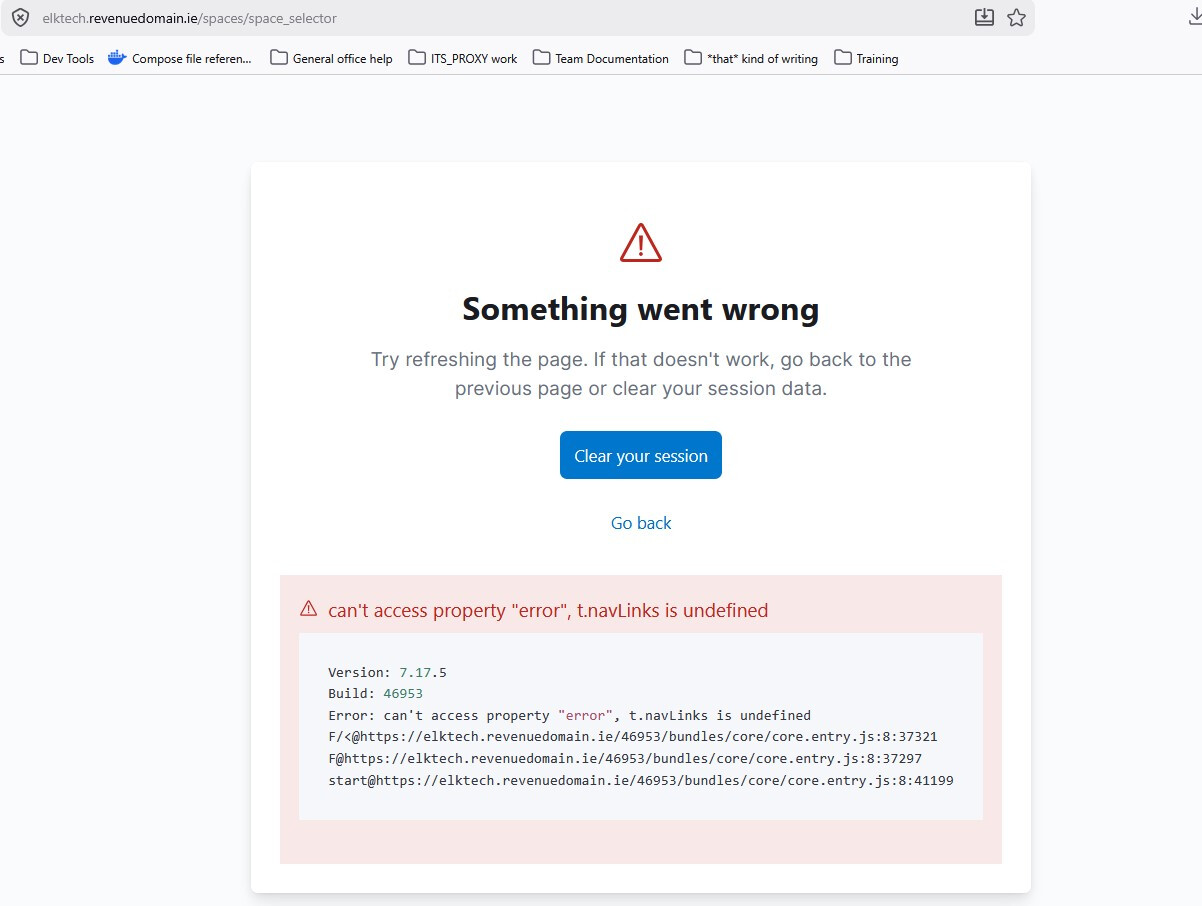
Upgrading containerised ELK with ROR - changelog detail and upgrade order confusion

Hi all!

We use KBN PRO plugin (apologies, haven’t found out how to verify our membership on the forums just yet) and our looking to upgrade our dockerised ELK stack across major versions (7.17 → 8.19.15 → 9.x) . Our plan was as follows (for the first major ELK version upgrade)

  1. Do a rolling upgrade of ES, replaceing ES containers one node at a time in our cluster with a new container containing ES 8.19.15 and the corresponding ROR pluging (am I right in understanding that for a given version of ES, there’s one and only one compatible version of ROR I can install?)
    *during and after this step, there would be a window during which older ROR KBN versions are trying to interact with newer ROR ES versions

  2. Shut down all kibana instances then bring up one node at a time with new KBN and its corresponding ROR plugin

This order (ES→KBN) is the sequence prescribed by elastic.co, but when reviewing the ROR changelogs I found this concerning entry

:warning:Warning (KBN|ES) Internal API incompatibilities (to take advantage of rolling update capabilities, upgrade ROR KBN first)”
which seems to prescribe the opposite sequence to what elastic.co documents (ES first, then KBN).

So my questions are

  1. How would a cluster behave with the older readonlyrest_kbn_universal-1.48.0_es7.17.5 trying to interact with the newer readonlyrest_kbn_universal-1.48.0_es7.17.5?
    1. I know ROR documents well that the KBN/ES plugin versions should be aligned but they can’t be upgraded simultaneously, so how does that transitional period work? One of our 3 clusters is quite large with a lot of data so could take days to weeks to be fully upgraded.
  2. Am I misremembering some ROR documentation saying that the ES version we run constrains us to a single corresponding ROR version? I may have inferred that from the download page.
  3. If I am wrong on that, can I go ahead and upgrade ROR to the new versions (1.69.1) before upgrading ES and KBN?

Cheers!
DOBs

1 Like

Hi @DOBs,

Thanks for raising this thread. After my response, I will review our documentation and add the missing parts.

am I right in understanding that for a given version of ES, there’s one and only one compatible version of ROR I can install?

No. For example, the newest ROR 1.70.1 supports all ES versions since ES 6.7.0, and the KBN plugin supports versions since 7.9.0.

However, note that, for example, ROR 1.68.0 does not support ES 9.4.2, because ES 9.4.2 was released when ROR 1.69.x had already been released.

:warning:Warning (KBN|ES) Internal API incompatibilities (to take advantage of rolling update capabilities, upgrade ROR KBN first)”

Ah, there was a mistake in the changelog, which has already been fixed. It should say: “upgrade ROR ES first”.

We follow Elastic’s requirements here.

  1. How would a cluster behave with the older readonlyrest_kbn_universal-1.48.0_es7.17.5 trying to interact with the newer readonlyrest_kbn_universal-1.48.0_es7.17.5?

I guess you are asking about one of the following cases, or maybe all of them:

  1. KBN nodes have ROR {n-version}, some ES nodes have ROR {n-version}, and one ES node has been upgraded and has ROR {n+1 version}
  2. KBN nodes have ROR {n-version}, and all ES nodes have ROR {n+1 version}
  3. Some KBN nodes have ROR {n-version}, one KBN node has ROR {n+1 version}, and all ES nodes have ROR {n+1 version}

Excluding the state where all KBN and ES nodes have aligned ROR versions, any other state should be considered transitional. You should upgrade ROR ES first, then ROR KBN.

So, ROR should support rolling upgrades in the following cases:

  1. The ES cluster is partially upgraded
  2. The ES cluster is fully upgraded, but the KBN cluster has not been upgraded yet
  3. The ES cluster is fully upgraded, and the KBN cluster is partially upgraded

The first and second cases have always been supported.
The third case is supported since ROR 1.69.0.

  1. I know ROR documents well that the KBN/ES plugin versions should be aligned but they can’t be upgraded simultaneously, so how does that transitional period work? One of our 3 clusters is quite large with a lot of data so could take days to weeks to be fully upgraded.

Referring to the above, this is not a problem.

We advise our clients to keep ROR versions aligned because some of them were upgrading only one plugin while leaving the other one unchanged, for example, ROR ES 1.68.0 with a very old ROR KBN 1.60.0.

We guarantee that ROR KBN {n-version} can talk to ROR ES {n+1 version}, but we do not guarantee that it will be able to communicate with ROR ES {n+2 version}. That is why we tell our clients: “Please make sure that after your upgrade, the ROR plugin versions are aligned.”

  1. Am I misremembering some ROR documentation saying that the ES version we run constrains us to a single corresponding ROR version? I may have inferred that from the download page.

No, no :smiley: We are proud of the fact that each version of ROR supports the newest ES/KBN version and older ones too: all 9.x, all 8.x, all 7.x for ES and KBN starting from 7.9.0, and even the ancient ES 6.7.x for the ES plugin.

  1. If I am wrong on that, can I go ahead and upgrade ROR to the new versions (1.69.1) before upgrading ES and KBN?

Yes, this is a great idea. You can upgrade ROR first, make sure that everything works with the upgraded version, and then upgrade the ES/KBN cluster.

When you upgrade ES/KBN and ROR at the same time, in case of any problems, you will not know whether it is an ES/KBN issue or an ROR-related issue. So this approach is highly recommended.

Excellent, glad to have that cleared up :slight_smile:

Great nuance to know, cheers!

Hmmm, that makes me think we should maybe only upgrade our ES ROR plugin one version ahead of our KBN ROR plugin, playing leap frog a little bit to get all the way up to the latest and having X rounds of upgrades, where X is approximately the number of ROR versions that we’re behind. Is that sensible?

That’s a relief to hear.

Great point. We can keep it more modular that way :smiley: